

How to Sell on Amazon India (2026) — The Complete Seller Guide
Amazon Seller Services
Key Takeaways
- Amazon India does not charge a monthly fee. You pay only when you sell — a referral fee, a closing fee, and (if you use Amazon's shipping) a weight-handling fee. GST at 18% applies on those fees.
- From 16 March 2026, the referral fee is 0% on products priced ₹1,000 and below, across most categories — a structural change, not a temporary offer.
- GST is mandatory for most sellers, regardless of turnover. The ₹40 lakh exemption that protects small offline businesses does not apply to online sellers of taxable goods.
- You don't need a company. You can register as an individual or sole proprietor with your own PAN and GST.
- A trademark unlocks the best tools. Brand Registry, A+ Content and a Brand Store all need a registered or applied-for trademark — without one, you sell as a generic seller.
- You choose how to ship: Amazon fulfils it for you (FBA), Amazon picks up from you (Easy Ship), or you ship yourself (Self-Ship). Each has different costs and trade-offs.
- You get paid about 7 days after delivery, on a regular cycle — not instantly. Plan your cash flow around it.
- Your account health is a number you must protect. Late shipments, cancellations and policy breaches lower it, and a low score can suspend your account.
💡 Quick Answers
+| Question | Answer |
|---|---|
| Do I need GST to sell on Amazon India? | For most products, yes — taxable goods need a GSTIN regardless of turnover. You can sell without one only if you sell only tax-exempt products, or qualify under the small-supplier single-state carve-out. FBA effectively requires GST. |
| How much does it cost to start? | Creating an account is free. There is no monthly subscription fee in India. You pay per-sale fees only. |
| How long until I'm live and selling? | Registration takes 15–30 minutes with documents ready; the account is usually active within 24–72 hours after verification. |
| What documents do I need? | PAN, a GST number (for taxable goods), a bank account, and a mobile number and email. Address proof for verification. |
| What is the referral fee in 2026? | 0% on products priced ₹1,000 and below across most categories. Above ₹1,000, category rates apply. Verify on sell.amazon.in. |
| FBA, Easy Ship or Self-Ship? | Self-Ship for low volumes and lowest fees; Easy Ship for the Prime badge without warehousing; FBA for fast movers and hands-off scaling. |
| When do I get paid? | About 7 days after delivery, on a regular 7-day cycle, after fees, 18% GST on fees, and 1% TCS. |
📑 Table of Contents
+- 1.Why Sell on Amazon India in 2026
- 2.What Is Amazon Seller Central?
- 3.How to Register: Step by Step
- 4.Documents You Need
- 5.GST Rules for Amazon Sellers
- 6.Listing Your Products
- 7.Listing Optimization
- 8.Categories That Need Approval
- 9.Brand Registry, Trademark & A+ Content
- 10.FBA vs Easy Ship vs Self-Ship
- 11.Amazon Seller Fees Explained (2026)
- 12.Work Out Your Profit: The Calculator
- 13.Advertising on Amazon
- 14.How and When You Get Paid
- 15.The STEP Program
- 16.Account Health & Suspension
- 17.Common Mistakes New Sellers Make
- 18.A Note on Global Selling
- 19.Myth vs Fact
- 20.Frequently Asked Questions
- 21.Glossary
So you want to sell on Amazon. Maybe you make something, maybe you've found a product you can source well, maybe you're just tired of watching everyone else sell online while you don't. Whatever brought you here — this guide walks you through the whole thing, start to finish, in plain language. No jargon, no assumptions that you already know how any of this works. Just what you actually need to do, in the order you need to do it. By the end you'll understand how selling on Amazon India really works in 2026 — the costs, the rules, the choices — well enough to start. And if you'd rather we handled it for you, that option's here too. But you don't need us to follow this. You can do this yourself.
1. Why Sell on Amazon India in 2026
If you make or source a product and want to reach buyers across the country, Amazon India is one of the largest doorways available to you. The platform reaches every serviceable pincode in India, and Amazon's own seller community has grown to 12 Lakh+ businesses (1.2 million-plus) selling on amazon.in. (This is Amazon's own published figure; independent estimates of "active" sellers are lower — treat the headline number as directional.)
What makes 2026 a genuinely different year to start is a change in the economics. In March 2026, Amazon restructured its selling fees in a way that favours smaller, lower-priced products — the kind most new Indian sellers actually start with. The headline: products priced ₹1,000 and below now carry zero referral fee across most categories. Amazon has described this as structural rather than promotional, and paired it with reduced fees in several higher-priced categories and savings for sellers who ship multiple units together.
For you, the practical meaning is simple: the cost of testing a product on Amazon is lower than it has been in years. That doesn't make selling easy — competition, returns and advertising costs are real, and we cover all of them honestly in this guide — but the barrier to getting started has genuinely dropped.
2. What Is Amazon Seller Central?
Amazon Seller Central is the control panel for your selling business. It's a separate website from the amazon.in that shoppers use — you log in at sellercentral.amazon.in, and everything you do as a seller happens there.
Think of it as the back office of your Amazon shop. From inside Seller Central you:
- Add products and create listings
- Set your prices and manage stock
- Receive and process orders
- Track payments and download settlement reports
- Run advertising campaigns
- Monitor your account health and performance
- Raise support cases when something goes wrong
You can use Seller Central from a desktop browser or through the Amazon Seller mobile app, which covers most day-to-day tasks — listing, order updates and notifications — from your phone. Many small sellers run their entire business from the app.
One thing worth understanding early: when you register, you own this account. Your login, your registered mobile number and email, your bank details — they stay yours. If you ever take help from an agency or freelancer, the safe and correct way for them to work is for you to invite them as a user with limited permissions from inside Seller Central, so you keep control and never hand over your password. We mention this now because it matters, and we'll come back to it.
3. How to Register as an Amazon Seller: Step by Step
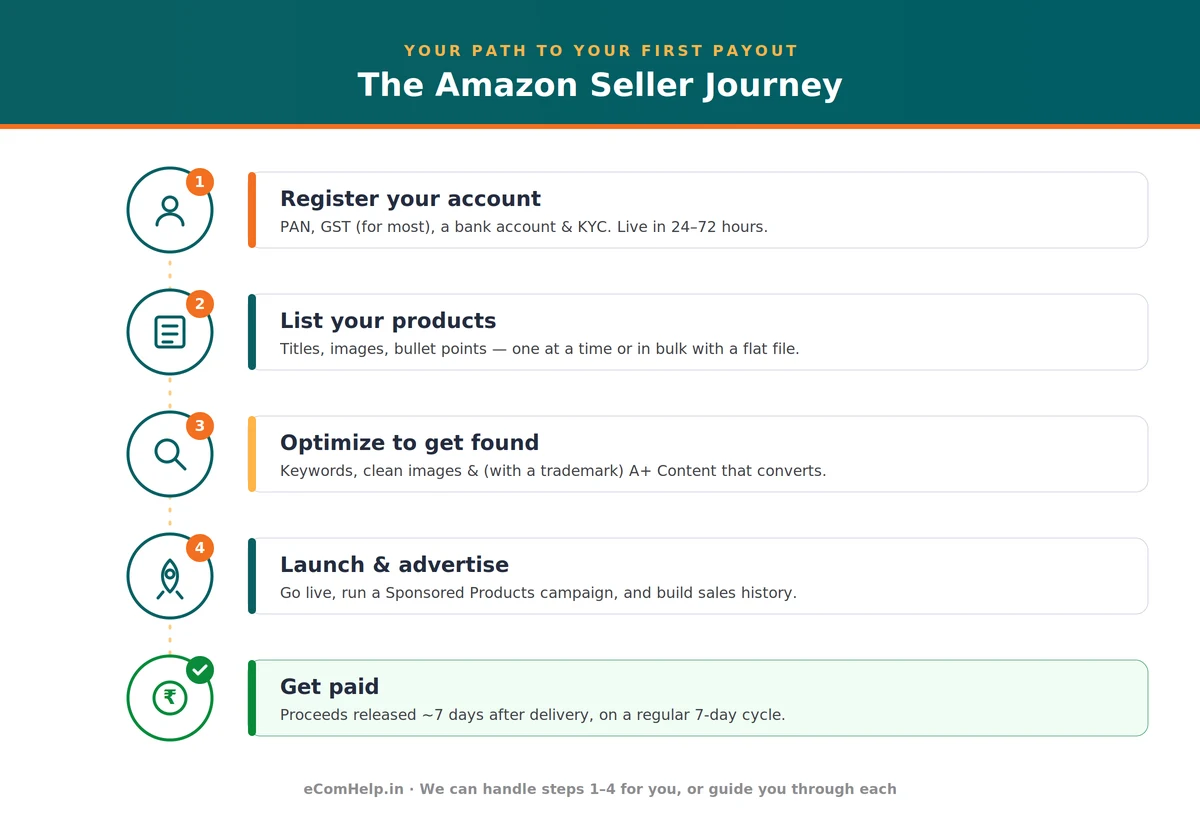
Registration is faster than most people expect. If your documents are ready, the form itself takes 15–30 minutes. Here's the full sequence.
Step 1 — Go to the seller signup page
Open sell.amazon.in and choose to start selling. You'll either sign in with your existing Amazon customer account or create a new account using your email or mobile number. Using a dedicated business email (not your personal one) keeps things tidy from day one.
Step 2 — Enter your business details
You'll provide your business name and address, and choose your business type — most new sellers register as an Individual / Sole Proprietor using their own name and PAN, which is completely valid. You don't need a registered company to sell.
Step 3 — Enter your GST number
If you sell taxable goods, you enter your GSTIN here, and Amazon verifies it. If you sell only tax-exempt products, you select the option that says so instead. (The full GST picture — including when you genuinely don't need a number — is in the next section.)
Step 4 — Complete verification (KYC)
Amazon verifies your identity, usually through a short video KYC call or document upload, along with your PAN and address proof. This is the step that decides how fast you go live, so have clear, valid documents ready.
Step 5 — Add your bank account
This is where Amazon will deposit your sales proceeds. The account should match your registered business name or your own name (for a proprietorship).
Step 6 — Set your shipping and tax settings
Choose how you'll fulfil orders (we explain FBA, Easy Ship and Self-Ship later), set your dispatch locations, and confirm your tax settings.
Step 7 — List your first product and launch
Once your account is approved, you can create listings and go live. Approval typically lands within 24 to 72 hours of completing verification.
Want Us to Launch You on Amazon?
Account setup, listings, optimization and launch — handled end to end. From ₹4,999, one-time, no monthly lock-in. You keep full control of your account.
See Onboarding Plans →4. Documents You Need to Register
Have these ready before you start the form — gathering them mid-way is the most common reason registration stalls.
| Document | Who needs it | Notes |
|---|---|---|
| PAN | Everyone | Personal PAN is fine for a sole proprietor; company PAN for a company |
| GST number (GSTIN) | Sellers of taxable goods | Mandatory for most; see exceptions below. Don't have one? We can help you get it |
| Bank account | Everyone | For receiving your sales payments; name should match your business/PAN |
| Mobile number & email | Everyone | Use a dedicated business email; this becomes your account contact |
| Address proof | Everyone | For business address verification during KYC |
That's the core set for a standard registration. If you plan to register a brand and use A+ Content, you'll also need a trademark (covered in the Brand Registry section). If you intend to use Amazon's warehouses (FBA), a GST number is effectively required — more on that next.
5. GST Rules for Amazon Sellers: What's Actually True
This is the section that trips up the most new sellers, because the rule for online sellers is different from the rule for ordinary shops. Let's make it clear.
The default: most Amazon sellers need a GST number
If you sell taxable goods on Amazon, you generally need a GST registration before you can list them — and this applies regardless of your turnover. The ₹40 lakh threshold that lets small offline businesses skip GST does not protect online sellers of taxable goods. So "my sales are small, I don't need GST" is true for a neighbourhood shop, but usually not for an Amazon seller.
The exceptions: when you can sell without GST
There are two genuine situations where you can sell on Amazon without a GSTIN:
- You sell only tax-exempt products. Some goods are GST-exempt — for example unbranded food grains, certain books, and a handful of other categories. If everything you sell is exempt, you can register by selecting "I sell only tax-exempt products" and skip the GSTIN. The moment you add a taxable product, the rule changes.
- You qualify under the small-supplier carve-out. Following a GST Council decision, small sellers supplying goods through online marketplaces can be exempt from compulsory GST registration if both of these are true: your turnover is below the normal threshold (broadly ₹40 lakh for goods, lower for special-category states) and you sell only within your own state — no inter-state sales. The catch is real: the moment you ship to a buyer in another state, you lose this exemption and need a GSTIN.
TCS: the 1% you'll see deducted
Once you're GST-registered and selling, Amazon collects 1% Tax Collected at Source (TCS) on your taxable sales and deposits it with the government against your GSTIN. This isn't an extra cost you lose — it's a credit. It appears in your GST records (auto-populated for you), and you claim it back when you file your returns.
6. Listing Your Products on Amazon
A listing is your product's page on Amazon — the title, images, price and description a shopper sees. Getting it right is the single biggest thing in your control, because a good listing is what turns a search into a sale.
Two ways to create a listing
- Match to an existing product. If someone already sells the exact same item, you can list against the existing product page and simply add your offer. Common for resellers and distributors.
- Create a new listing. If it's your own product or brand, you create a fresh listing with your own title, images and content. This is the route for manufacturers and brand owners.
You can add products one at a time through Seller Central, or upload many at once using a bulk flat file (a spreadsheet Amazon provides) — useful when you're launching a larger catalogue.
What every listing needs
- Title — clear, specific and keyword-rich, but readable. Lead with the brand and the most important details.
- Images — clean, high-resolution, white background for the main image. Show the product from multiple angles and in use. Images sell more than words.
- Bullet points — five short, scannable points covering benefits and key features, not just specifications.
- Description — the fuller story of the product; this is where A+ Content takes over if you're a registered brand.
- Search terms (backend keywords) — hidden keywords in Seller Central that help Amazon match your product to searches, without cluttering the visible listing.
7. Listing Optimization: Getting Found and Getting Bought
Creating a listing gets you on Amazon. Optimizing it gets you found. Amazon ranks products through its search system (you'll see it called the A9/A10 algorithm), and it rewards listings that are both relevant to what someone searched and likely to convert into a sale.
- Write the title for a human first, the algorithm second. Stuff every keyword in and it reads like spam and converts badly; ignore keywords and you don't get found. Aim for the middle.
- Mind the mobile view. Most Indian shoppers buy on their phones, where titles get cut short. Put the decisive words first.
- Match how people actually search. Indian buyers often search in a mix of English and Hindi terms ("kurti for women", "cooker 5 litre"). Reflect real search language.
- Use all five bullet points, and make them about benefits ("keeps food hot for 6 hours"), not just specs.
- Fill the backend search terms. Invisible to shoppers but they help Amazon match you to more searches.
- Good images reduce returns. When photos show exactly what arrives, fewer buyers are disappointed — protecting your ratings and return costs.
Optimization isn't a one-time task. The best sellers revisit their top listings, test different images and titles, and keep what works. If you'd rather have this done professionally, it's part of what our onboarding and account-management services cover — but the fundamentals above are entirely learnable.
8. Categories That Need Approval
Most products you can list immediately. But Amazon restricts ("gates") certain categories and brands to protect buyers — meaning you need approval before you can sell in them. This is normal and not a sign anything is wrong.
Categories that commonly require approval or extra documentation include items like certain groceries and food products (which may need FSSAI licensing), beauty and personal care, some electronics, and various branded or safety-sensitive goods. The exact list and requirements change over time and by category.
To get ungated, Amazon typically asks for supporting documents — for example invoices from your supplier, applicable licences (like FSSAI for food), or brand authorization. If you're planning to sell in a sensitive category, check its requirements before you build inventory, so you're not stuck with stock you can't list yet.
9. Brand Registry, Trademark & A+ Content
If you own or are building a brand, this is where Amazon's most valuable tools open up — and there's one key that unlocks all of them: a trademark.
Amazon Brand Registry is a free program that gives brand owners more control over their listings and access to powerful selling tools. To enrol, you need a trademark for your brand — either already registered, or with an application filed and pending (Amazon now accepts pending applications in India). Enrolment itself costs nothing; the cost is in obtaining the trademark.
About the trademark: you apply through the Indian trademark office (IP India / CGPDTM). A full registration takes several months, but you can typically use the ™ and enrol related benefits once your application is filed and accepted. Importantly, you can launch and sell on Amazon without a trademark — you simply do so as a generic seller and add brand tools later.
What Brand Registry unlocks
- A+ Content — the enhanced product description, with rich images, comparison charts and brand storytelling on your product page. One of the most effective ways to improve how often visitors actually buy. (A+ requires a trademark / Brand Registry — it is not available to generic sellers.)
- Brand Store — a free, multi-page storefront for your brand on Amazon, like a mini-website.
- Sponsored Brands ads — a richer ad format (your logo + multiple products) available only to registered brands.
- Brand Analytics & protection tools — data on how shoppers find and buy, plus tools to report counterfeits and hijackers.
10. How Will You Ship? FBA vs Easy Ship vs Self-Ship
When an order comes in, someone has to store the product, pack it, and deliver it. Amazon gives you three ways to handle this, and the choice affects your costs, delivery speed, and how much work lands on you.
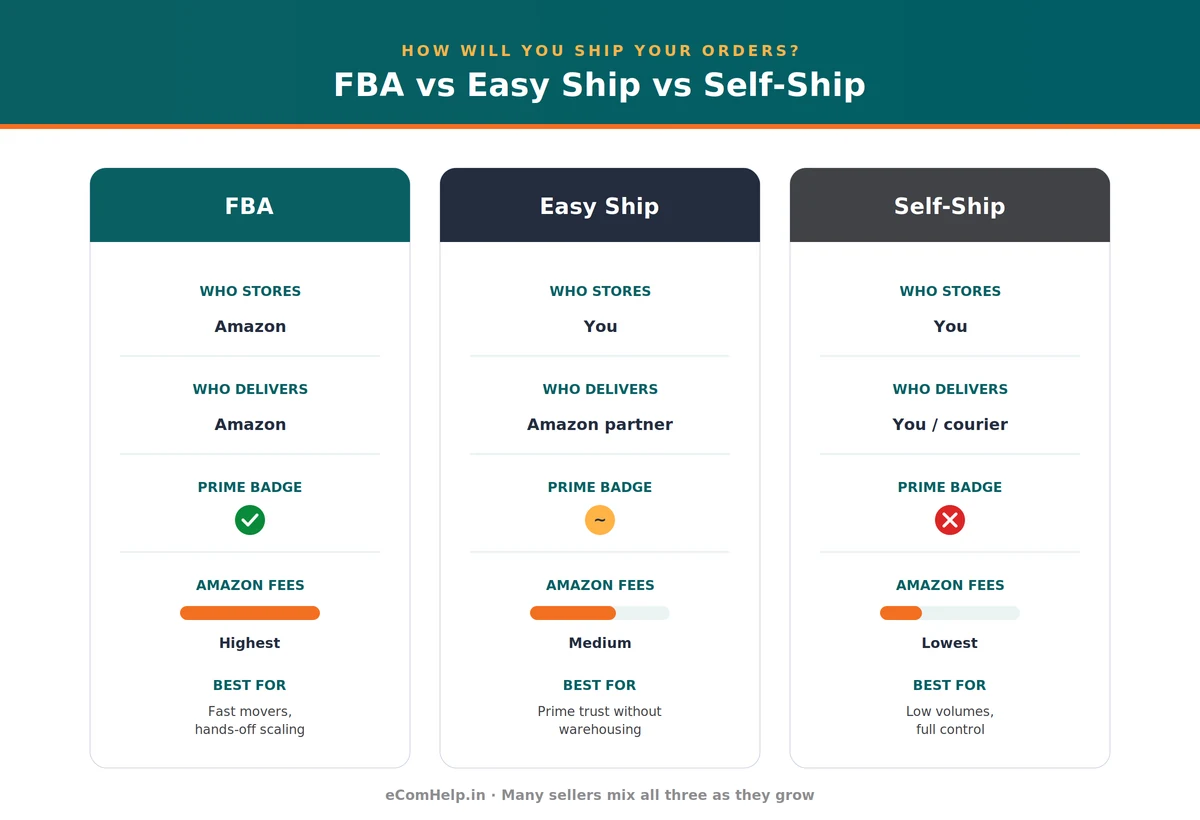
| FBA | Easy Ship | Self-Ship | |
|---|---|---|---|
| Who stores stock | Amazon | You | You |
| Who packs | Amazon | You | You |
| Who delivers | Amazon | Amazon's partner | You / your courier |
| Prime eligible | Yes | Often | Usually not |
| Returns handled by | Amazon | Largely Amazon | You |
| Amazon fees | Highest | Medium | Lowest |
| Your workload | Lowest | Medium | Highest |
| Best for | Fast movers, scaling, hands-off | Prime trust without warehousing | Low volumes, fragile/large, full control |
How to choose, practically
- Just starting, few orders a day, or bulky/fragile items? Self-Ship keeps costs and risk low while you learn.
- Want the Prime badge and faster delivery without handing over your stock? Easy Ship.
- Selling fast enough that packing every order yourself is a bottleneck, and you want maximum reach? FBA — but watch storage fees on slow-moving stock.
Many sellers run a mix: FBA for their fast movers, Self-Ship for everything else. You're not locked into one choice.
11. Amazon Seller Fees Explained (2026)
This is where new sellers most often miscalculate, so we'll be precise. First, the foundation: there is no monthly subscription fee in India. You pay Amazon only when you sell. Four fee types make up almost everything you'll see:
- Referral fee — a commission as a percentage of the item price, varying by category. The big 2026 change: products priced ₹1,000 and below carry a 0% referral fee across most categories. Above ₹1,000, category rates apply.
- Closing fee — a flat fee per item sold, varying by price band and fulfilment method. It ranges from as low as ₹1 (Easy Ship, low-price items) up to around ₹72 for some items priced above ₹1,000, with most low-price items in the ₹13–₹26 range.
- Weight-handling / shipping fee — charged when Amazon ships (FBA or Easy Ship), based on weight and distance. Starts at ₹37/item. Amazon charges on the higher of actual or volumetric weight, where volumetric = (L × B × H in cm) ÷ 5000.
- FBA fees (only if you use FBA) — a pick-and-pack fee of ₹17 per unit for a standard item up to 1 kg (rising with weight), plus storage at ₹50 per cubic foot per month. New to FBA? "Try FBA for Free" waives FBA-specific fees for your first 100 units or 3 months, whichever comes first.
A worked example (illustrative — verify rates): you sell a kitchen product at ₹750, Self-Ship. Referral fee ₹0 (under ₹1,000), closing fee ~₹20, GST on fees (18% of ₹20) ~₹3.60 → total Amazon fees ~₹23.60, leaving ~₹726 before your own product and shipping costs. The same product at ₹1,200 attracts a category referral fee (say 7% = ₹84) plus closing fee plus 18% GST — so crossing the ₹1,000 line meaningfully changes your economics. Pricing around the ₹1,000 threshold is a real strategic decision in 2026.
Fee figures are current as of June 2026. Amazon updates these regularly — verify your category's exact rates at sell.amazon.in/fees-and-pricing before pricing.
12. Work Out Your Profit Before You List: The Calculator
Never guess your margin — calculate it before you set a price. Amazon gives you a free tool to do exactly this. The Amazon Revenue Calculator (inside Seller Central) lets you enter a product's price, weight and category, and shows you the fees and your estimated net proceeds — and it lets you compare FBA against your own fulfilment side by side.
Two costs new sellers routinely forget: the 18% GST on fees (small per order, but it adds up), and returns (a percentage of orders come back; in some categories that's significant). If your numbers only work when everything goes perfectly — no returns, no ad spend, top price — they don't really work. Price for the realistic case.
13. Advertising on Amazon: Getting Seen
When you launch, almost nobody can find your product — it sits below established sellers with reviews and sales history. Advertising is how you buy visibility while you build that history.
- Sponsored Products — the workhorse. Your product appears in search results and on competitor pages, marked "Sponsored". You pay only when someone clicks. This is where almost every seller starts.
- Sponsored Brands — a banner with your logo and several products at the top of search. Available only to trademark-registered brands.
- Sponsored Display — ads that follow shoppers across Amazon and beyond.
The numbers that matter
- CPC (cost per click) — in India commonly a few rupees in low-competition categories to ₹25–₹80+ for competitive head terms.
- ACoS — what percentage of ad-driven sales went to ad spend. New product 30–50% while it builds; established 10–25%.
- TACoS — ad spend as a share of total sales. A healthy, growing product often sits around 8–15%.
A realistic approach: start with a Sponsored Products campaign, let automatic targeting run for a couple of weeks to learn which terms convert, then take the winners into a manual campaign and add irrelevant terms as negatives. Start with a budget you can treat as tuition — roughly ₹300–₹500 a day is enough to gather real data. This is exactly what our Ads Management service handles for sellers who'd rather not run it themselves.
14. How and When You Get Paid
Amazon does not pay you the instant a sale happens — understanding the timing protects your cash flow. Your sales proceeds are released about 7 days after the order is delivered, and Amazon disburses your available balance to your bank account on a regular 7-day cycle — including your Pay-on-Delivery orders. Your very first payment can take a little longer as the cycle establishes, and eligible sellers can unlock faster payment cycles as they grow.
What's deducted before you get paid: Amazon's fees (referral, closing, shipping, FBA) plus 18% GST on them; 1% TCS deposited against your GSTIN (reclaimable — not a loss); and any refunds for returns in that period.
A reserve you should expect: Amazon often holds a portion of your balance for a few days to cover potential returns or claims, especially for newer accounts. It's released on schedule — but it means your available balance is a bit less than your total balance early on.
15. The STEP Program: How Amazon Rewards Good Performance
Amazon runs a performance program called STEP that sorts sellers into tiers based on how well they operate — and gives better terms to better sellers. You don't apply; you're placed automatically and reviewed regularly. The tiers run from Basic → Standard → Advanced → Premium. New sellers usually start at Standard.
As you move up, the benefits get genuinely valuable: lower fees, shorter payment-reserve periods (your money freed up faster), more frequent payouts (up to daily at Premium), storage discounts, free advertising credits, and guaranteed account management at the top tier. What pushes you up is consistent operational quality — low cancellation rates, dispatching on time, low return rates, and good listing and service quality scores.
16. Account Health: The Number That Keeps Your Account Alive
Everything above only matters if your account stays active — and that depends on your account health. Amazon tracks how you perform and expresses it largely through an Account Health Rating (a score from 0 to 1000), plus underlying metrics:
- Order Defect Rate — orders with a problem (negative feedback, A-to-z claim, chargeback). Keep it very low.
- Late Dispatch Rate — orders you shipped late.
- Cancellation Rate — orders you cancelled after the buyer placed them.
- Policy violations — listing issues, authenticity complaints, restricted-product breaches.
Let any of these drift too far and Amazon issues warnings; ignore them and your account or listings can be suspended.
The far better strategy is prevention: ship on time, keep stock accurate so you don't cancel, describe products truthfully, and read Amazon's policy notices instead of ignoring them. Account health is much easier to protect than to repair.
17. Common Mistakes New Sellers Make
- Ignoring the 18% GST on fees when pricing — and discovering the margin is thinner than expected.
- Forgetting returns in the profit calculation — a category with heavy returns can erase a margin that looked fine on paper.
- Thin, keyword-stuffed listings with poor images — they neither rank nor convert.
- Running ads without managing them — spending daily and never checking what's working.
- Cancelling orders because inventory wasn't kept accurate — one of the fastest ways to damage account health.
- Pricing without the calculator — guessing the margin instead of working it out.
- Handing full account access (password, bank) to an agency — instead of inviting them as a permitted user and keeping control.
18. A Note on Global Selling
Once you're established on Amazon India, Amazon offers a Global Selling program that lets you sell to customers in other Amazon marketplaces — the US, UAE, UK and more — from India. It's a genuine opportunity for the right products, but it adds complexity: international compliance, shipping and tax. It's best considered after you've found your footing domestically, not as a starting point.
19. Myth vs Fact
| # | Myth | Fact |
|---|---|---|
| 1 | "Amazon charges a monthly fee to sell in India." | There is no monthly subscription in India. You pay only per-sale fees. The $39.99/month plan you may have read about is the US. |
| 2 | "My turnover is small, so I don't need GST." | The ₹40 lakh exemption is for offline businesses. Most online sellers of taxable goods need GST regardless of turnover. |
| 3 | "I need a registered company to sell on Amazon." | You can sell as an individual / sole proprietor using your own PAN and GST. No company required. |
| 4 | "I need a trademark to start selling." | You can launch as a generic seller without a trademark. A trademark is only needed for Brand Registry, A+ Content and a Brand Store. |
| 5 | "A+ Content is available to everyone." | A+ requires a trademark and Brand Registry. Generic sellers can't use it. |
| 6 | "FBA is always the cheapest option." | FBA is the most convenient, not the cheapest. Self-Ship has the lowest Amazon fees; FBA can cost more on slow-moving stock. |
| 7 | "I get paid as soon as I make a sale." | Funds are released about 7 days after delivery, on a regular 7-day cycle. Plan for the gap. |
| 8 | "Once my listing is live, the work is done." | Listings need ongoing optimization, and your account health must be actively protected to avoid suspension. |
| 9 | "An agency needs my password to manage my account." | Never hand over your password. Invite them as a permitted user in Seller Central — you keep ownership and control. |
Launch on Amazon — Done For You
Account setup, listings, optimization, brand & FBA support, handled end to end. From ₹4,999, one-time. You keep full control — we never hold your password or card.
See Onboarding Plans →20. Frequently Asked Questions
Launch & Grow on Amazon with eComHelp
We help sellers across India get live on Amazon and run their accounts the right way — account setup, listings, optimization, ads, and ongoing management, handled end to end. One-time onboarding with no monthly lock-in, and you keep full control of your account at every step. We never hold your password or card.
Launch on Amazon — Done For You
Account setup, listings, optimization, brand & FBA support — handled end to end. From ₹4,999, one-time. You keep full control — we never hold your password or card.
See Onboarding Plans →📚 References
+For readers who want to verify the details cited in this guide, here are the source documents. Fee figures and programmes are current as of June 2026 and are subject to change by Amazon and by government notification.
- Amazon India — Sell on Amazon (sell.amazon.in)
- Amazon India — Fees & Pricing (sell.amazon.in/fees-and-pricing)
- Amazon India — Fulfilment by Amazon (sell.amazon.in/shipping-and-fulfillment/fulfillment-by-amazon)
- Amazon India — STEP programme (sell.amazon.in/grow-your-business/step)
- Amazon India — Seller Central & Seller Forums (sellercentral.amazon.in)
- Amazon India newsroom — 2026 fee restructuring announcement (aboutamazon.in)
- CBIC (cbic-gst.gov.in) and the GST portal (gst.gov.in)
- Intellectual Property India / CGPDTM (ipindia.gov.in) — trademarks