

How to Sell on Blinkit in India (2026): Fees, Registration, and the Rules That Decide Whether You Profit
Everything you need to get live, stay profitable, and avoid the one mistake you can’t undo, checked against the Blinkit Seller Hub as of July 2026.
Blinkit Seller Services
Key Takeaways
- Blinkit is India's largest quick-commerce platform — roughly 46% market share, about 2,243 dark stores, and a net average order value near ₹525 (2026).
- One GST registration covers all of India. You do not need a separate GST number for each state.
- The ₹25,000 "activation fee" per listing request is not lost money — it's credited to your Ads Wallet and spent on ads, valid one year. It cannot be waived by anyone.
- Commission and platform charges are fixed and non-negotiable. Your business category sets your commission rate.
- Your product launches into a 30-day Trial in 10–15 dark stores of one city-cluster you choose.
- If a product fails its Trial, it is permanently discontinued and can never be re-listed — which makes your first product and cluster the most important decisions you'll make.
- Minimum ad budget is as low as ₹1,000, run through Brand Central.
- Velocity decides profit. Slow-moving stock accrues daily storage fees and can turn a payout negative.
- Start with one proven product in one well-matched cluster, then expand on evidence.
💡 Quick Answers
+| Question | Answer |
|---|---|
| How much does it cost to sell on Blinkit? | There's no separate registration fee. Your real costs are the ₹25,000 activation amount per variant (which goes into your own Ads Wallet), your inventory, and the platform's fixed fees — commission, inwarding, storage, fulfilment, and returns — deducted as you sell. |
| Can you sell on Blinkit without GST? | No. GST is mandatory. But you only need one registration, and it covers selling across every state. |
| Is the ₹25,000 refundable? | Not as cash — but it isn't lost either. It's credited to your Ads Wallet and spent promoting your product, valid for one year. There are no waivers. |
| How long does it take to go live on Blinkit? | Plan for around 30 to 60 days end to end. Promises of "7 days" or "14 days" are marketing — the review, compliance, and inwarding steps take real time. |
| Is selling on Blinkit profitable? | It can be, if your gross margin is healthy (around 60–70%) and your product sells quickly. Velocity is the deciding factor: a fast-moving product profits, while slow stock bleeds margin to daily storage fees. |
| Do you need GST or FSSAI in every state? | No to both. One GST registration is enough to sell across India, and FSSAI is needed only at your own business location, if you sell food. |
📑 Table of Contents
+- 1.The essentials, up front
- 2.Is Blinkit right for your brand?
- 3.SOR, OR, and the inventory-led shift
- 4.Documents and compliance
- 5.How to register on Blinkit, step by step
- 6.The real cost of selling on Blinkit
- 7.Blinkit myths vs facts
- 8.What actually sells on Blinkit
- 9.Getting live: the GRN check and your first shipment
- 10.The one rule that changes everything: trial failure is permanent
- 11.Payouts, your SOA, and the negative-payout risk
- 12.Advertising on Blinkit: Brand Central
- 13.Use the free Keyword Analytics tool
- 14.Why listings get rejected, and how to avoid it
- 15.Complaints, ratings, and why your first weeks matter most
- 16.Blinkit vs Zepto vs Instamart (and vs Amazon and Flipkart)
- 17.About the "skip the ₹25,000 deposit" offers
- 18.When it helps to bring in support
- 19.Everything you need to start on Blinkit
- 20.Blinkit seller FAQs
- 21.Blinkit Glossary
- 22.Blinkit Cities & Clusters
Selling on Blinkit is not like selling on Amazon or Flipkart, and the brands that lose money here are almost always the ones who assumed it would be. Blinkit is quick commerce: your stock sits in neighbourhood dark stores for 10-minute delivery, you pay to keep it there, and the platform decides where and how fast your product grows. Get the rules right and it's one of the fastest ways to build a brand in India. Get them wrong and you can lock up lakhs in fees and lose a product permanently.
This guide covers all of it — registration, the real ₹25,000 fee, the full cost stack, the expansion ladder, payouts, ads, and the compliance details that trip up most first-timers — checked against the Blinkit Seller Hub as of July 2026.
1. The essentials, up front
Blinkit is India's largest quick-commerce platform: around 46% market share in early 2026, roughly 2,243 dark stores as of 31 March 2026, and a net average order value near ₹525. It's owned by Eternal, formerly Zomato.
To sell as a new brand, you register on the Blinkit Seller Hub, get your products approved, and pay a ₹25,000 activation fee per listing request. That fee is credited to your Ads Wallet and spent on promoting your product — it is not money you lose. You need one GST registration to sell across India, and FSSAI only if you sell food, only at your own location.
Once you're live, your product launches into a Trial in 10–15 dark stores of one city-cluster you choose. Blinkit assesses it over about 30 days. Pass, and it climbs a ladder: city, region, metros, all of India. Fail the Trial, and the product is permanently discontinued — it can never be re-listed. That one rule should shape every decision below.
2. Is Blinkit right for your brand?
Blinkit is curated. It onboards brands, not unbranded resellers, and it suits some products far better than others. Check yourself honestly before you invest a week in the process.
Blinkit fits you well if you're a brand owner, manufacturer, or authorised distributor with a trademark or brand-authorisation letter; if you sell impulse, high-frequency products — snacks, beverages, breakfast, personal care, home care, supplements — priced above roughly ₹150; if your gross margin sits around 60–70% before platform costs; and if you have the working capital to put ₹25,000 per variant into your ad wallet, plus inventory, before your first payout arrives.
Reconsider if you have no GST, if your product sells for under ₹150 (the per-order fulfilment fee alone tends to break the maths), or if you need tight control over your own restocking — because on Blinkit, expansion and replenishment are driven by the system, not by you.
Starting small is the right instinct here, but "small" doesn't mean "casual": a product that fails its trial is gone for good, so even one SKU deserves a deliberate launch.
3. SOR, OR, and the inventory-led shift
Blinkit runs on dark stores, and that shapes the commercial models you can enter under.
SOR — Sale or Return is the standard route for new and emerging brands, and almost certainly yours. You keep ownership of your stock, pre-load it into dark stores, and sell to customers; unsold units come back to you as Return to Vendor. You set your price and run your catalogue through the Seller Hub. The day-to-day feels like a marketplace, but you carry the inventory risk and pay for storage and fulfilment — which the fees reflect.
OR — Outright is where Blinkit buys your stock in large purchase orders and owns it outright, including the right to discount. There's no per-variant activation deposit and no storage or fulfilment fees to you. But you don't choose OR — Blinkit offers it to brands that have already proven they sell quickly. A first-time brand cannot start here. Brands typically graduate from SOR to OR by demonstrating consistent velocity and reliable supply over time, so treat OR as a destination you earn, not a door you pick.
The inventory-led (1P) shift matters for context. Since around September 2025 Blinkit has moved much of its business to a first-party model, buying and selling under its own entity, and by late in the financial year the majority of its order value already ran through its own inventory. For a seller, the trade-off of the inventory-led model is real: it removes a lot of compliance and logistics burden because Blinkit holds the stock, but it also removes some of your pricing and promotional control, and it's gated by Blinkit's own buying decisions. New brands still come on board through the SOR route described here, but the platform underneath is changing — so confirm the current model in your Seller Hub when you apply.
4. Documents and compliance
Compliance is where brands lose the most time and money to bad advice, so be precise here.
GST: one registration covers all of India. A single GST registration is sufficient to sell across states on Blinkit. When your product expands from one city to many, you do not add new GST registrations to grow. If anyone tells you that you need GST in every state you'll sell in, they're wrong — and if they're charging you for it, doubly so.
There's one genuine nuance. GST law separates selling into a state from storing stock in a state; historically, holding inventory in another state's warehouse meant registering it as an Additional Place of Business. Under Blinkit's inventory-led model, much of that burden shifts as Blinkit holds the stock. Apply with your single GST and let the Seller Hub tell you what each region actually requires, rather than pre-buying state registrations on anyone's advice.
FSSAI: only where you operate. If you sell food, beverages, or supplements, you need a valid FSSAI licence for your own business location — not at Blinkit's dark stores. Your licence, your location.
You'll also need your PAN, a bank account with a cancelled cheque, your trademark certificate (or a brand-authorisation letter), and your business registration. A proprietorship works with valid GST, though private limited and LLP structures scale more easily.
Two details worth getting right the first time, because they can't be undone: the business and social-media details you enter at onboarding cannot be edited later, and a brand name can't be changed once a product is listed — you'd have to delist and reapply. Slow down at the form stage.
5. How to register on Blinkit, step by step
The process isn't hard. It's precise, and the order matters.
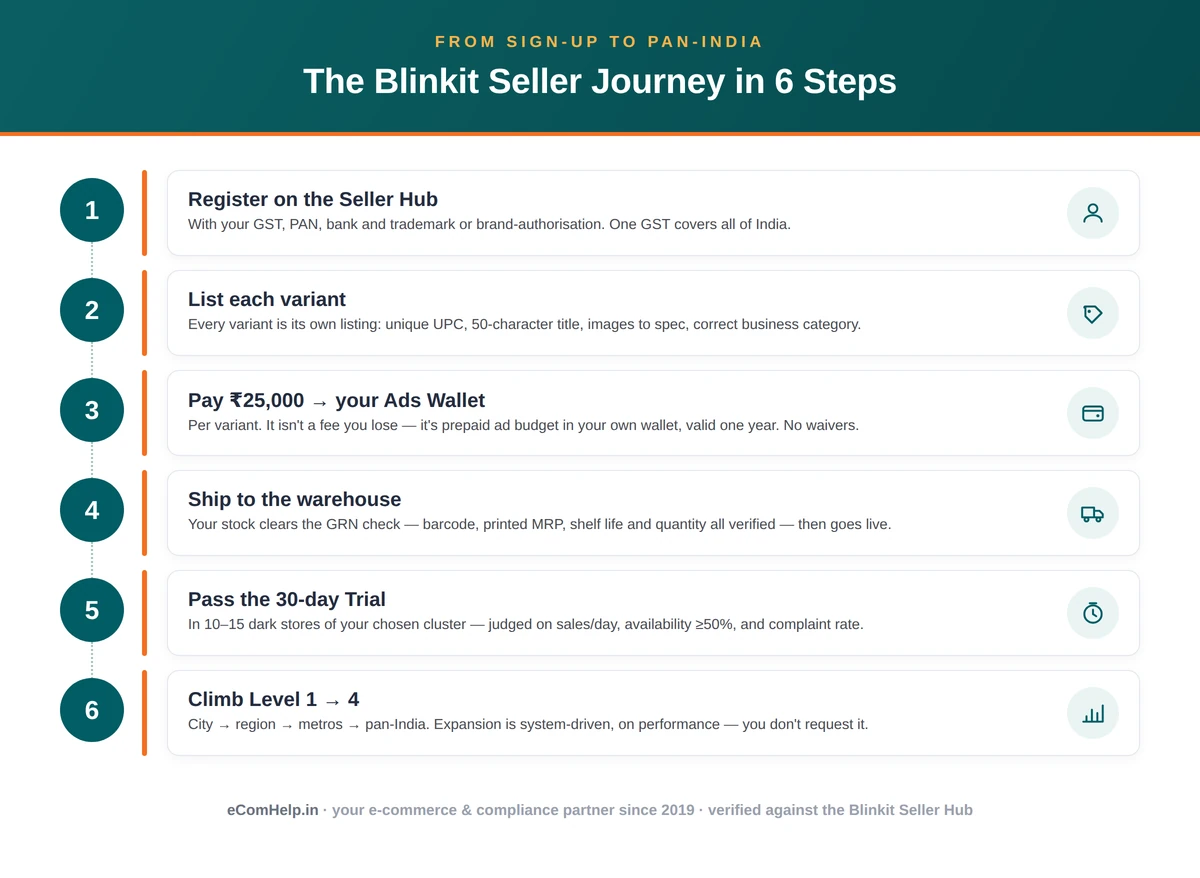
- Create your Seller Hub account with your business email and mobile number, verified by OTP.
- Enter your business details and GSTIN. Blinkit auto-fetches your business information from your 15-digit GST number, so keep it ready. Add your category and bank details.
- Upload documents for verification — GST, PAN, FSSAI (if food), trademark or authorisation, cancelled cheque. Clean, legible scans matter: many rejections are simply blurry images or mismatched names.
- Wait for product review. Listings are reviewed and approved within Blinkit's stated timeline. This is not instant and not self-serve — real reviewers assess your catalogue.
- List each product individually. There's no bulk upload. For every variant, set the correct product category (it decides where you appear in the app) and the correct business category — the field that sets your commission rate. Add your UPC, a title, images, price, tax, and dimensions.
- Choose your trial cluster and pay the ₹25,000 activation fee into your Ads Wallet.
- Ship your inventory. Once approved (status: "Launch Awaited"), dispatch stock to Blinkit's warehouse. After it clears the goods-receipt (GRN) check, your product goes live in your trial cluster.
Catalogue rules that catch people out:
- Each variant needs its own unique UPC and its own listing — different size, flavour, or pack means a different listing.
- Combo and multi-packs are listed as their own products, and you enter the unit details of each item inside the combo separately. Given how the fulfilment fee works, combos are often your best margin lever on lower-priced items.
- No UPC? Request an exemption through a Help & Support ticket and you'll receive codes to use.
- Titles are capped at 50 characters and follow Blinkit's format; feature detail goes in the attributes, not the title. There's no exception to the limit, and special characters get stripped for consistency, so write clean.
- Images: JPEG or PNG, at least 1024×1024 pixels, up to 10–12 per product, with four mandatory — front, back, side, barcode. Only one UPC should be visible, and it must be legible.
- Product dimensions are mandatory — they drive your logistics and storage charges.
- Your business category is the field that sets your commission — choose it correctly, because a wrong category means you pay the wrong rate until you raise a ticket to fix it. If your category isn't listed, you can suggest one via a ticket.
- You can't edit your own catalogue afterwards. Every change, including an image swap, goes through a support ticket — so get it right before you submit.
6. The real cost of selling on Blinkit
This section decides whether your brand makes money here, so give it a careful read.
The ₹25,000 activation fee
You pay ₹25,000 per listing request to activate a product, and since each variant needs its own listing, treat it as ₹25,000 per variant. What most guides get wrong:
- It is not "per SKU per state" and not "per SKU per cluster." It's per listing request. Adding clusters later does not re-charge it.
- It is not a fee you lose. The ₹25,000 is credited to your Ads Wallet and spent promoting that product. It's prepaid advertising, valid one year from recharge.
- It cannot be waived. There are no waivers — not directly, not through an agency, not through a "partner." Anyone offering to get you onto Blinkit without it is not describing something real.
To launch three variants you commit ₹75,000 — but that ₹75,000 is your opening ad budget, sitting in your wallet ready to deploy. It's capital you'll use, not cash you'll never see. That's also why launching fewer variants is smart: you commit less while you learn what sells.
The ongoing charges
Beyond activation, Blinkit deducts the following as you operate. Every one is fixed and non-negotiable — there's no secret rate and nobody negotiates them down for you:
- Commission — slab-based, set by your product's business category (the field you choose at listing). Your exact rate is in the Commission Calculator on your Seller Dashboard, under "How to Sell." Check it there; it's specific to your category and it's the honest number.
- Inwarding fee — a small per-unit charge when stock is received at the warehouse.
- Storage fee — per unit, per day, for as long as your stock sits in a dark store. This is the quiet margin-killer: a product that doesn't move pays rent every day.
- Fulfilment fee — per order, for pick, pack, and delivery. On low-priced products this is often the single largest cost, which is why sub-₹150 items struggle.
- Removal and return fees — for stock pulled back or returned.
- GST — all charges are quoted exclusive of GST, so add 18% when you model costs.
For many small brands, the effective platform cost lands around a third of the selling price before product cost and ads. That's survivable with the right margin and velocity — and fatal without them. Know your numbers before you list.
Inputs: selling price · COGS · business-category commission % (from seller's own Commission Calculator) · expected days in storage · units/month · monthly ad spend. Fixed: inwarding, storage/unit/day, fulfilment/order, removal, return; +18% GST on fees; TCS. Outputs: net margin/unit · break-even velocity · what ₹25k/variant means · days-in-storage sensitivity · the point where SOA turns negative. -->
The calculator on this page takes your selling price, cost, expected days in storage, and ad spend, and returns your real net margin and the sales pace you need to break even. The only figure you'll fetch yourself is your commission rate, from your Seller Dashboard — everything else is a known, fixed fee, already built in.
A worked example: where the money actually goes
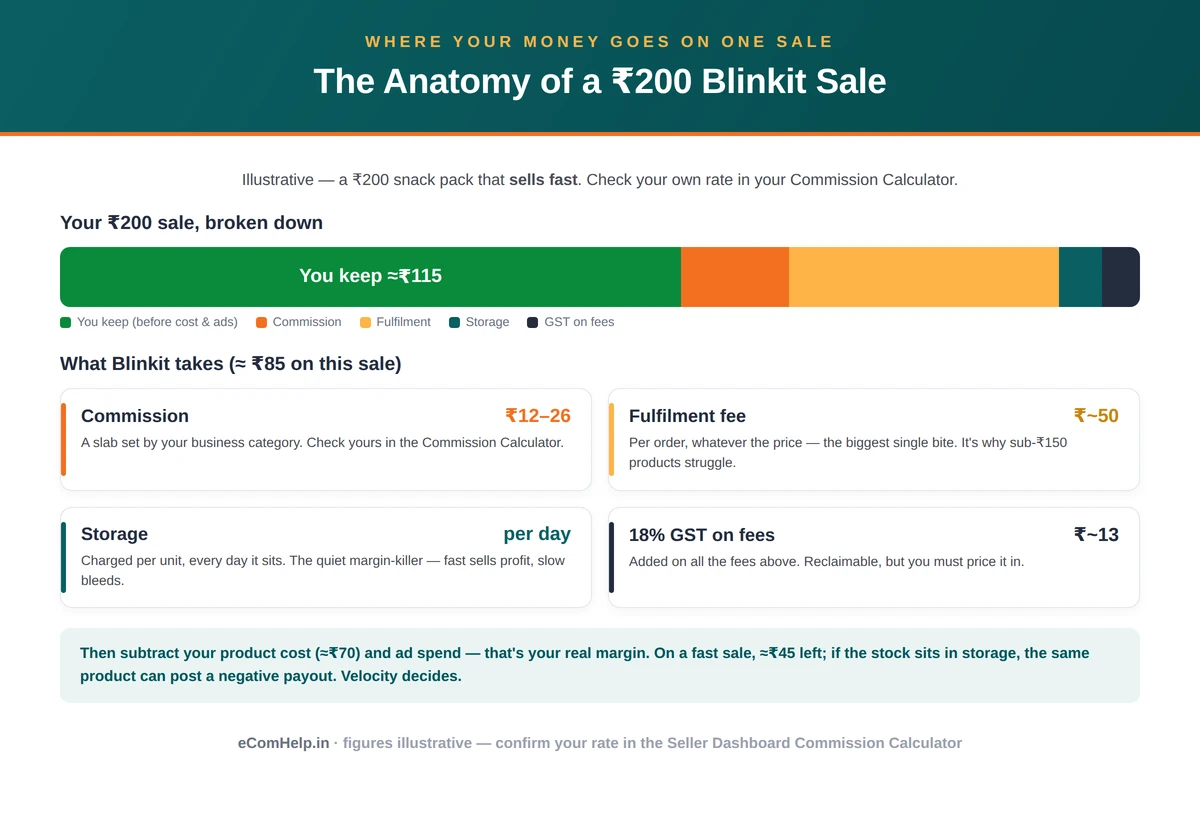
Numbers make this concrete, so here's an illustrative product. Say you sell a snack pack at ₹200, and it costs you ₹70 to make and pack. Your gross margin before Blinkit is ₹130, which feels comfortable. Now watch what the platform takes.
On a ₹200 order, your commission (using an illustrative mid-slab rate — check your own in the Commission Calculator) might be around ₹12–₹26. The fulfilment fee of roughly ₹50 lands on every order regardless of price, and it's the biggest single bite. Inwarding adds a few rupees per unit. Then storage: at roughly ₹1 per unit per day, a pack that sells in 10 days costs ₹10 in storage, but one that sits for 45 days costs ₹45 — on a single unit. Add 18% GST on all those fees, and a small share for returns.
Put together, a ₹200 product that moves quickly might surrender ₹75–₹90 to the platform, leaving you ₹40–₹55 before your ad spend. The same product sitting slowly in storage can see its margin evaporate entirely — and if it's slow enough, tip into a negative payout for that cycle. This is the whole game in one example: the same product is profitable at high velocity and loss-making at low velocity. Your selling price, your cost, and above all your speed of sale decide everything. Model your own product honestly before you commit a rupee, because the difference between a 25% net margin and a negative one is often just how fast your stock moves.
What this means for your pricing
Two practical takeaways from that maths. First, sub-₹150 products rarely work, because the ~₹50 fulfilment fee alone eats too large a share. If your price point is low, look at combo or multi-packs — a bundle pays that fulfilment fee once across more units, which can lift your effective margin meaningfully. Second, price with the full stack visible. The MRP that looked profitable against your cost alone can be underwater once commission, fulfilment, storage, and GST are stacked on. Set your Blinkit price knowing the real deductions, not the gross margin.
🧮 Blinkit Profit & Break-even Calculator · Coming soon
Drop in your selling price, cost, expected days in storage, and ad spend to see your real net margin and the sales pace you need to break even. We’re building this for every platform — check back shortly.
7. Blinkit myths vs facts
Every claim on the left is something published on a ranking guide or an agency page this year. Every fact on the right is what Blinkit tells its own sellers, as of July 2026.
| # | What most guides tell you | What Blinkit actually says |
|---|---|---|
| 1 | The ₹25,000 is "per SKU, per state" | It's per listing request — not multiplied by states |
| 2 | The ₹25,000 is "per SKU, per cluster" | Still per listing request; adding clusters doesn't re-charge it |
| 3 | The ₹25,000 is a listing fee you lose | It's credited to your Ads Wallet and spent on ads — valid one year |
| 4 | "An agency can get the ₹25,000 waived" | No waivers exist. Nobody can waive it |
| 5 | "You need GST registration in every state" | One GST registration is sufficient to sell across states |
| 6 | "You need FSSAI in every operating state" | Only at your own business location |
| 7 | "Your Category Manager negotiates your commission" | Commission is fixed and non-negotiable |
| 8 | "A dedicated manager is assigned to guide you" | No dedicated SPOC is assigned; support is via tickets and training |
| 9 | "You need 80% sell-through for your next PO" | The 80% figure raises your listing limit; the trial availability threshold is 50% |
| 10 | "Products move through Levels 1 to 5" | It's Launch Awaited → Trial → Levels 1–4; trial runs in 10–15 dark stores |
| 11 | "Minimum ad spend is ₹15,000–₹3 lakh a month" | Ad budgets can start as low as ₹1,000 |
| 12 | "No UPC means you can't list" | You can request a UPC exemption via a support ticket |
If you've been quoted anything from the left column as a reason to pay someone, you now have a better question to ask. And if a figure here ever differs from what you see in your own Seller Hub, trust the Seller Hub.
Launch on Blinkit — Done For You
Onboarding, account management and Brand Central ads — handled end to end. A defined deliverable, transparent pricing, and we never hold your password or card.
Talk to Us →8. What actually sells on Blinkit
Not every product belongs in a 10-minute app, and knowing where you fit saves you an expensive mis-launch.
Blinkit's core is daily-need and impulse categories — packaged food and snacks, beverages, dairy, breakfast items, staples, personal care, home care, baby and pet care. Over 2025 and 2026 the platform widened well beyond groceries into beauty and cosmetics, electronics accessories, toys, home and kitchen, stationery, gifting, and gourmet or premium lines, and larger neighbourhoods now stock tens of thousands of products. That breadth is an opportunity if your product suits impulse buying, and a warning if it doesn't.
The shopper behaviour behind the numbers is the thing to internalise: baskets are small and frequent, with an average order around ₹525, and buying is fast and often unplanned. That rewards products that are easy to decide on in seconds — a recognisable need, a clear pack, a price that doesn't require deliberation. It works against considered, compared, once-in-a-while purchases, which people research rather than tap.
So the products that tend to win for new brands share a shape: an impulse or daily-need category, an AOV-friendly price (roughly ₹200 and up, so the fee stack has room to work), small or single-serve pack sizes that suit quick delivery, and packaging that reads clearly at thumbnail size, because most of your shelf is a small image on a phone. If your product fits that shape, Blinkit can move fast for you. If it doesn't, no amount of ad spend fixes the mismatch.
9. Getting live: the GRN check and your first shipment
Between "listing approved" and "product live" sits one physical step that trips up first-timers, so it's worth understanding.
Once your listing is approved, its status becomes Launch Awaited — approved, but waiting on stock. You then dispatch inventory to Blinkit's warehouse. When it arrives, it goes through the GRN check — Goods Receipt Note — where the receiving team physically verifies what you sent: the barcode scans, the MRP printed on the pack, the shelf life remaining, and the quantity. Only after your stock clears this check does your product actually go live in your trial cluster and the trial clock start.
A few things smooth this step. Send stock with enough shelf life remaining — near-expiry inventory gets rejected at the door. Make sure your printed MRP and barcode match what you listed exactly, because a mismatch here is a common reason stock is held. And send a sensible first quantity — enough to maintain that 50% availability across 10–15 dark stores through a 30-day trial, but not so much that slow movement buries you in storage fees. The calculator can help you size this: work backwards from the daily sales you need to pass trial, and stock to support it with a buffer, not a warehouse-load of hope.
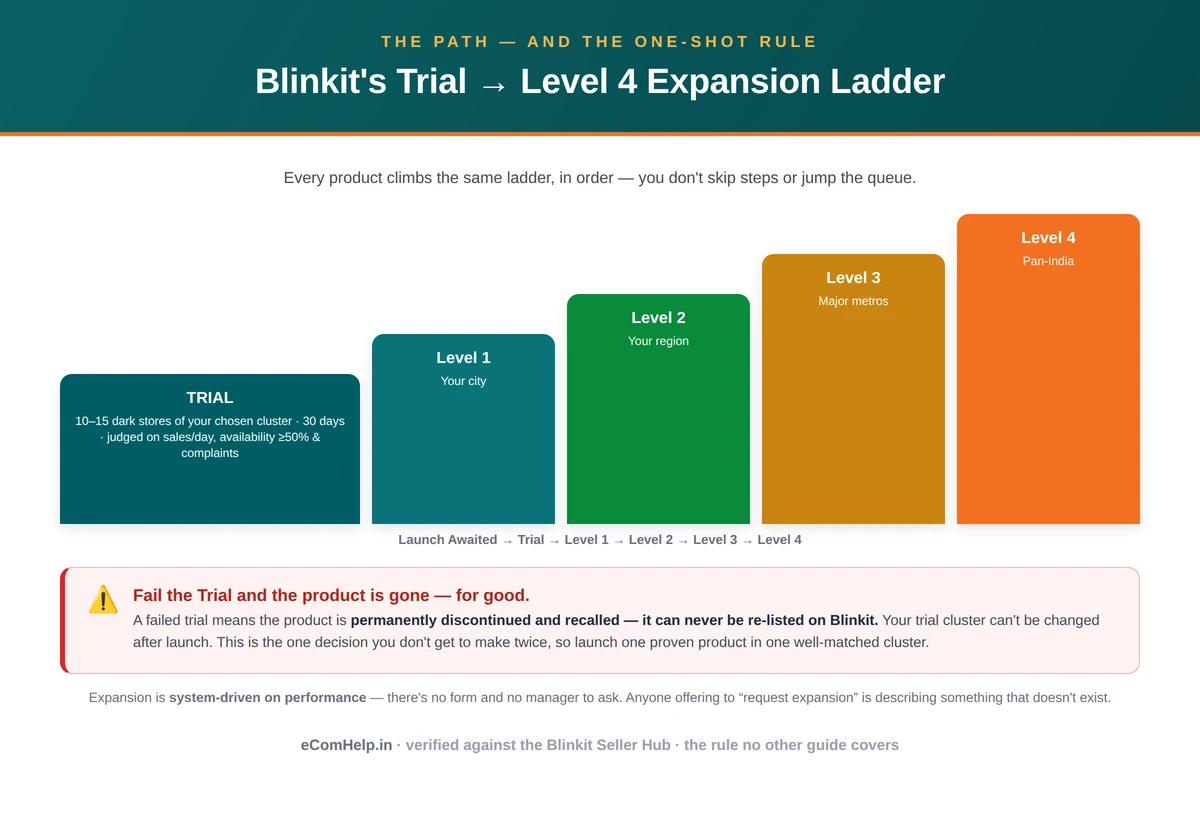
Every product travels the same path: Launch Awaited → Trial → Level 1 → Level 2 → Level 3 → Level 4. You don't skip steps and you don't jump the queue.
Launch Awaited is where your product sits after approval but before its first shipment is received. Here you pick your trial cluster and send in your stock.
Trial begins automatically once your inventory clears goods-receipt. Your product launches in the 10–15 best-performing dark stores of your chosen cluster and runs for about 30 days, assessed on three metrics:
- Sales performance — average units sold or sales value, per day per store. The target depends on your business category and appears in your Performance tab; you need to clear it on units or value, not both.
- Availability — your product must stay in stock at least 50% of the time. Run out, and the clock works against you.
- Complaint rate — it must stay below your category's threshold, which means packaging, quality, and listing accuracy matter from day one.
Clear all three and your product climbs. Level 1 covers every store in that city served by the same warehouse. Level 2 reaches the entire region — all cities of your cluster. Level 3 takes you across the major metros. Level 4 is full pan-India.
Two mechanics surprise people. First, expansion is system-driven — you cannot request it. There's no form and no manager to ask; the system decides from your performance. Anyone offering to "request expansion for you" is describing something that doesn't exist. Second, it happens in phases, strong regions first — never everywhere at once. There's an "auto-launch in all cities" toggle in your dashboard; understand what it does before switching it on, because it pushes your product and your inventory commitment into new stores as you level up.
One widely misquoted rule: the 80% figure is not a replenishment requirement. It's the threshold to increase your listing limit — once at least 80% of your current listings have been received and processed at the warehouse with a positive payout, the system raises how many products you can list.
10. The one rule that changes everything: trial failure is permanent
This is the single most important fact about selling on Blinkit, and it's missing from almost every other guide.
If your product fails its trial, it is permanently discontinued. Its inventory is recalled. It can never be re-listed on Blinkit — not under a new listing, not after a fix, not ever.
On Amazon or Flipkart, a product that doesn't sell simply sits there; you adjust the price, refresh the images, and try again next quarter. Blinkit doesn't work that way. Your trial is a one-time assessment, and there is no retake for that product.
Two rules compound it. Your trial cluster cannot be changed after launch — you choose your city-cluster once and live with it for the assessment, so a cluster that doesn't match local demand handicaps your one attempt before it starts. And exiting a city after you've expanded is effectively one-way — step out of a market and you generally can't step back in.
So launch accordingly: one product — your proven best-seller — in one cluster chosen on evidence. Not your whole catalogue, and not eight variants across three cities because the activation capital felt like it should buy breadth. One strong product, one right market, every chance to clear its trial. Prove it, then expand with data instead of hope.
This isn't caution for its own sake; it's how the platform rewards you. Ten variants rushed into trial are ten one-shot exams in markets picked blind, with capital locked in each and every failure permanent. One proven product in the right cluster is the only move the rules actually reward. On Blinkit, slow is fast.
11. Payouts, your SOA, and the negative-payout risk
Blinkit pays out every 15 days, released on the nearest working day to the 1st and the 15th. There are no partial payouts — a cycle settles as a whole.
Your Statement of Account (SOA) is your financial record: a full summary of sales, fees, commission, and payout, downloaded monthly from Billing → Payout Details. It itemises your payout breakup, order sheets, and every deduction. Daily sales sit under Sales Summary (updated the next day), and invoices — including stock moved to dark stores — live under Invoices.
A negative SOA balance happens when your deductions exceed your sales in a cycle. Recall the charge stack — commission, daily storage, fulfilment per order, returns. If a product sold slowly one fortnight while sitting in storage the whole time, the storage and fulfilment charges can outrun the revenue, and you end the cycle owing more than you earned.
This is the "trap" behind the angry posts online, but its cause is specific: slow-moving stock paying daily storage rent. It isn't a hidden scam — it's the arithmetic of a low-velocity product on a platform that charges for shelf time, and it's avoidable. Choose products that move, price with the full fee stack in view, and don't over-commit inventory that then sits. The calculator on this page shows the exact sales pace at which your SOA turns positive; run your product through it before you commit, and you stay above the line.
To see how it happens, picture a fortnight where your product sold just a handful of units but you'd sent a large batch of stock that sat across the dark stores the whole time. The few orders drew commission and fulfilment fees; a return or two added more; and every unit in storage quietly accrued its daily charge for fourteen days. Add GST on all of it, and the deductions can add up to more than the little revenue those few sales brought in. Nothing was stolen — the stock simply cost more to hold and move than it earned. The cure is the same as the diagnosis: velocity, right-sized inventory, and pricing that accounts for storage days. Sell through faster than your stock accrues charges, and your SOA stays comfortably positive.
12. Advertising on Blinkit: Brand Central
Every brand on Blinkit advertises eventually — partly because that ₹25,000 activation credit is waiting in your Ads Wallet, and partly because visibility in a 10-minute app is competitive.
Ads run through Brand Central, reached from the Ads tab in your Seller Hub. There are three broad formats — Spotlight, brand banners, and performance ads — and you can target by city, pincode, behaviour, and category, and schedule by time of day.
The minimum ad budget can be as low as ₹1,000. Not ₹15,000, and not ₹2–3 lakh a month — figures that get quoted by agencies whose retainers only make sense at scale. You can run ads yourself, on a small budget, long before you'd need anyone to manage them.
The system is prepaid: spend draws down from your Ads Wallet, and when the wallet empties, campaigns pause until you recharge. You see impressions, clicks, CTR, CPC, and conversions in near real time, and you can add more than one user to manage ads through Brand Central — useful if a colleague or partner runs your campaigns.
A word on that ₹25,000 activation credit sitting in your wallet: deploy it deliberately, not all at once and not left untouched. The instinct to hold it "safe" wastes it, and the opposite instinct — dumping it across every keyword on day one — burns it before you've learned anything. The disciplined approach is to put it behind your strongest product and your best two or three search terms first, watch what converts, and let the data guide the rest. It's your money and your first real read on demand; spend it like a test, not a lottery ticket.
Set your ROAS expectations honestly. Agencies advertise "4x" as if it's normal; for small brands starting out, founders themselves report closer to 1.2x–1.5x, sometimes lower, until product, availability, and targeting are dialled in. And when your wallet has balance but your ads aren't showing, it's almost always a stock problem, not a campaign one — ads can't serve where your product isn't physically available. Fix availability, and the ads follow.
If you want help, Blinkit runs ads training on alternate Thursdays, and afterwards a dedicated Ads Manager assists with optimisation — the one place a genuinely assigned point of contact exists.
13. Use the free Keyword Analytics tool
Inside your Seller Hub, under Seller Growth Tools, there's a free Keyword Analytics tool that most sellers walk past. It shows what people search for on Blinkit — search volume over a period, a conversion signal, and, most usefully, the top products people actually bought after searching a term, city by city. That last one is competitive intelligence: you can see who owns a search term in a market before deciding to compete for it.
One caution on reading it. The tool labels searches as high, medium, or low "conversion," and it's tempting to read "low conversion" as "unmet demand — list this." Be careful: the low-conversion terms are usually dominated by broad brand searches and perishable or ambiguous words, which signal browse behaviour or supply limits, not a gap you can fill. Trust the volume and the top-bought products per city — those tell you what's really selling, and where. Use it to choose your first product and cluster on evidence, which is exactly the decision you only get to make once.
14. Why listings get rejected, and how to avoid it
Rejections are common and almost always preventable:
- Blurry or low-resolution images — the most common rejection. Upload clean, high-resolution photos with legible labels.
- UPC problems — the barcode must be clearly visible and singular in the image. Multiple or unreadable barcodes get bounced.
- Missing mandatory information — for food, that means nutrition information, your FSSAI number, and marketer/manufacturer addresses.
- Duplicate listings — every listing must be unique.
- Wrong category — beyond the rejection risk, your business category sets your commission, so an error costs money as well as time.
When something is rejected, open the Request ID and select "See Reason," fix the specific issue, and reapply.
15. Complaints, ratings, and why your first weeks matter most
Your product's early performance shapes its whole life on Blinkit, and two mechanics make the opening weeks disproportionately important.
First, ratings and reviews start appearing on the app after roughly 20 customer reviews. Those first buyers set the tone that every later shopper sees. A rocky start — a packaging fault, a quality slip, a listing that oversold — gets baked into your rating early and drags on conversion long after you've fixed the underlying issue. Getting the product right before you scale matters more here than on platforms where reviews accumulate slowly over months.
Second, complaints feed directly into whether your product survives. Remember that the trial assesses complaint rate against your category's threshold — so complaints aren't just customer-service noise, they're one of the three things standing between your product and permanent discontinuation. A high complaint rate can end a product.
Your Complaints tab, under Performance, is where you manage this. You can filter by product and time period and see total sales, complaints, and returns at a glance, then open any product to read the specific reason for each complaint along with the customer's remarks and any photos or videos they attached. That detail tells you exactly what to fix, and complaints usually trace to one of three causes, each with a clear response:
- Packaging problems — fix the packaging before you send your next batch of inventory. Don't ship more of the same fault.
- Content mismatch — the product is fine but the listing oversold or misdescribed it. Raise a ticket to correct the listing so expectation matches reality.
- Genuine quality issues — something deeper is wrong. Trace it to the root, whether that's your product or your supplier, and fix it there.
Treated as a monthly loop — read the complaints, find the cause, fix it, ship corrected stock or correct the listing — this is one of the most useful habits you can build. It protects your trial, your rating, and your margin all at once.
16. Blinkit vs Zepto vs Instamart (and vs Amazon and Flipkart)
Among quick-commerce platforms, Blinkit is the largest — around 46% of the market in early 2026, ahead of Swiggy Instamart and Zepto. All three run on dark stores, and a brand serious about quick commerce usually ends up on more than one. Blinkit publishes its commission slabs and offers a genuinely self-serve ads platform, which makes it comparatively transparent to work with; Zepto tends to negotiate terms through a manager relationship, and Instamart bundles differently.
Against Amazon and Flipkart, the shift is bigger. There you list centrally, ship when something sells, pay a commission plus shipping, and slow-selling products can simply exist quietly. Quick commerce is the opposite — hyperlocal, velocity-driven, small baskets, stock physically held in neighbourhood stores, and a fee structure that rewards fast movement and punishes shelf-sitting. A steady trickle-seller on Amazon can lose money on Blinkit; a fast-moving impulse product that gets lost on Amazon can thrive here. Different games, different rules.
17. About the "skip the ₹25,000 deposit" offers
You'll come across people — in Facebook groups, on WhatsApp, in your DMs — offering to get you onto Blinkit without the ₹25,000 activation fee: a "direct vendor code," a "partner shortcut," a "special arrangement."
Blinkit does not offer waivers on the activation fee, and says so plainly. There is no legitimate way for a new seller to skip it. So a bypass offer usually means one of a few things: reselling the Outright model (which new brands can't access and which doesn't work as implied), charging for a "code" that does nothing, or fishing for an upfront payment before disappearing. The activation fee is real, fixed, and has no waivers — and it isn't even lost money, since it becomes your ad budget. There's nothing to bypass.
18. When it helps to bring in support
You can do the groundwork yourself — the registration is a form, the documents are ones you already have, and the rules, now that you have them accurately, are learnable. Many brands handle their own onboarding and run their own early ads from that ₹1,000 minimum. Where outside help earns its keep is at the points where the stakes or the workload are highest.
There are really three. The one irreversible decision — which product, which cluster — is worth getting a second, experienced view on, because a trial failure can't be undone and a poorly chosen cluster wastes your one attempt. The ongoing operational load — listing execution to spec, availability monitoring against the 30-day clock, the complaints loop, and ad optimisation, month after month — is real work that competes with everything else you're running. And once your ad spend grows, a few points of better optimisation can more than cover a management fee.
If you do bring someone in, hold them to a clear standard: transparent, published pricing rather than "contact us for a quote"; no promises that contradict what you now know (no commission negotiation, no waived activation fee, no "7-day go-live," no guaranteed approval or ROAS); and a defined deliverable rather than a vague outcome. If a pitch contradicts what's on this page, trust the page — it's checked against Blinkit's own words.
19. Everything you need to start on Blinkit
That's the complete picture: who Blinkit is for, how to register, the real ₹25,000 fee, the full cost stack and the maths behind your margin, the compliance rules that matter, the expansion ladder, the one decision you can't undo, how payouts and ads and complaints actually work, and the honest answers to the questions sellers ask most.
Take it and start well. Apply with your single GST, choose one strong product and one well-matched cluster, price it with the full fee stack in view, ship enough stock to hold availability through the trial, and give it a real chance to climb. Do that, and you're not guessing your way onto Blinkit — you're launching on the same information the platform runs on. And if you'd rather have experienced hands on the high-stakes parts, you'll know exactly what good help looks like, because you'll understand the platform as well as anyone advising you.
This guide reflects Blinkit's seller policies as of July 2026. Platforms change — always confirm current details in your own Seller Hub, which is the most authoritative source there is. If something here no longer matches your panel, trust your panel.
20. Blinkit seller FAQs
Getting started & eligibility
The ₹25,000 activation fee
Charges, commission & margins
Catalogue & listing
Trial, expansion & the one-shot rule
Ads
Payouts & billing
Account & support
Complaints & quality
More questions
Launch & Grow on Blinkit with eComHelp
We help brands get onto Blinkit and run quick-commerce the honest way — onboarding, account management and Brand Central ads, handled end to end. A defined deliverable, transparent pricing, and you keep full control of your account at every step. We never hold your password or card.
Launch on Blinkit — Done For You
Onboarding, account management and Brand Central ads — handled end to end. A defined deliverable, transparent pricing. You keep full control — we never hold your password or card.
Talk to Us →📚 References
+The seller mechanics in this guide — fees, the activation amount, the expansion ladder, catalogue rules, payouts, and ad settings — reflect the Blinkit Seller Hub as of July 2026, and every one of them is verifiable inside your own seller account. Platform and market figures are drawn from public sources:
- Blinkit Seller Hub (seller.blinkit.com) — seller policies, fees, catalogue rules, and the expansion process.
- Blinkit Brand Central (brands.blinkit.com) — advertising formats, targeting options, and minimum budgets.
- Eternal Ltd investor filings, Q4 FY26 shareholder letter (April 2026) — dark-store count, average order value, order volumes, and market position.
- Reuters, citing Datum Intelligence (January 2026) — quick-commerce market-share figures.
Where a figure here ever differs from what you see in your own Seller Hub, treat the Seller Hub as authoritative — it's the live source, and this guide is a snapshot in time.
📖 Blinkit Glossary
+🌏 Blinkit Cities & Clusters
+On Blinkit, your trial cluster maps to a city — you pick one city-cluster to launch in, so it helps to know where the platform is active before you choose. As of 2026, Blinkit operates dark stores across the major metros and a fast-growing list of tier-2 and tier-3 cities. Coverage and open clusters change continually, so always confirm current serviceability in your Seller Hub before you commit to a launch city.
Delhi NCR & the North
Delhi, Gurugram, Noida, Ghaziabad, Faridabad, Jaipur, Lucknow, Chandigarh, Kanpur, Agra, Meerut, Ludhiana, Amritsar, Jalandhar, Aligarh, Gorakhpur, Haldwani. The Delhi-NCR cluster is Blinkit's largest and deepest assortment, which makes it competitive but high-demand — a common launch choice for brands whose buyers skew north.
West India
Mumbai, Pune, Ahmedabad, Surat, Vadodara, Nashik, Nagpur, Indore, Bhopal, Jodhpur, Kota, Udaipur. Mumbai and Pune are dense, fast-moving metros; the Gujarat and Madhya Pradesh cities are strong tier-2 options with less competition for shelf visibility.
South India
Bengaluru, Hyderabad, Chennai, Coimbatore, Kochi, Mysuru, Madurai, Vijayawada, Visakhapatnam, Mangaluru. Bengaluru and Hyderabad are among the most active quick-commerce markets in the country, with high basket frequency in personal care, health, and premium foods.
East & Northeast India
Kolkata, Patna, Ranchi, Jamshedpur, Bhubaneswar, Guwahati, Siliguri. These clusters are earlier in their quick-commerce curve — lower competition, and a genuine first-mover opportunity for the right category, though depth of demand varies city to city.
Choosing your cluster
Don't launch where you hope to sell — launch where your product's demand is provable. Use the Keyword Analytics tool to see what's searched and bought in each city, weigh competition against demand, and remember that your trial cluster can't be changed once you launch. This one choice is worth more research than any other step.